
Please note: FREE SCHOOL MEALS ARE CHANGING: Click here to find out more about changes to entitlement to free school meals from September 2026
Kepier School Logo
  • facebook.com/kepier
  • @kepiergw
  • info@kepier.com
  • 0191 512 8960
  • About Us
    • Headteacher
    • Ethos and Vision
    • Governors
    • Staff List
    • Admissions
    • British Values
    • Football Academy
      • Football Academy
      • Our Aims
      • Applications
      • Working in Partnership
      • Meet the Team
      • Latest News
      • Gallery
    • Requests For Copies
  • Learners
    • Uniform
    • Behaviour For Learning
    • Rewards
    • Extra Curricular Activities
    • Exam Information
    • Learner Voice
  • Parents
    • Letters To Parents
    • Year Group Info
      • Year 7 Manager
      • Year 8 Manager
      • Year 9 Manager
      • Year 10 Manager
      • Year 11 Manager
    • Parents’ Evenings
    • Uniform
    • Transition
    • Parent View
    • Parent Pay
    • Free School Meals
  • Curriculum
    • Curriculum Vision Statement
    • Art and Design
    • Business
    • English
    • French
    • Geography
    • Health and Social Care
    • History
    • ICT and Computer Science
    • Mathematics
    • Music
    • Physical Education
    • PSHCE
    • Religion, Philosophy & Ethics
    • Science
    • Technology
    • Typical Lessons
      • Subjects Taught – All Years
      • Subjects Taught – Football Academy
    • Key Stage 4 Course Information
    • SEN
      • SEND Classroom
    • Assessment
      • Reporting to Parents/Carers
      • Results
      • Exam Information
      • Progress 8
      • SMSC
  • Careers
  • Information
    • School Calendar
    • Times of the School Day
    • Term Dates
    • Policies
    • Results
    • Catering
      • Catering
      • Our Menus
      • Special Dietary Requirements
      • Parent Pay
    • Careers (CEIAG)
      • Careers Team
      • Careers Implementation
      • Careers Plan
      • Useful Links and Contacts
      • Useful Documents
      • Labour Market Information (LMI)
      • Destination Data
    • Safeguarding
      • Safeguarding Overview
      • Safeguarding Policies
      • Spotlight on Safeguarding Newsletters
      • Operation Encompass
    • Vacancies
    • Statutory Information
      • Ofsted
      • Financial Information
      • Pupil Premium
      • Send Information Report
      • DFE School Performance Tables
  • SEN
    • SEND Support at Kepier
    • SEN Information Report – Summer 2025
    • Kepier SEND Policy
    • SEND Classroom
  • Community
    • Community Facilities
    • Lettings and Room Hire
  • Most Able
  • Contact Us
  • Vacancies
Kepier School Logo
  • About Us
    • Headteacher
    • Ethos and Vision
    • Governors
    • Staff List
    • Admissions
    • British Values
    • Football Academy
      • Football Academy
      • Our Aims
      • Applications
      • Working in Partnership
      • Meet the Team
      • Latest News
      • Gallery
    • Requests For Copies
  • Learners
    • Uniform
    • Behaviour For Learning
    • Rewards
    • Extra Curricular Activities
    • Exam Information
    • Learner Voice
  • Parents
    • Letters To Parents
    • Year Group Info
      • Year 7 Manager
      • Year 8 Manager
      • Year 9 Manager
      • Year 10 Manager
      • Year 11 Manager
    • Parents’ Evenings
    • Uniform
    • Transition
    • Parent View
    • Parent Pay
    • Free School Meals
  • Curriculum
    • Curriculum Vision Statement
    • Art and Design
    • Business
    • English
    • French
    • Geography
    • Health and Social Care
    • History
    • ICT and Computer Science
    • Mathematics
    • Music
    • Physical Education
    • PSHCE
    • Religion, Philosophy & Ethics
    • Science
    • Technology
    • Typical Lessons
      • Subjects Taught – All Years
      • Subjects Taught – Football Academy
    • Key Stage 4 Course Information
    • SEN
      • SEND Classroom
    • Assessment
      • Reporting to Parents/Carers
      • Results
      • Exam Information
      • Progress 8
      • SMSC
  • Careers
  • Information
    • School Calendar
    • Times of the School Day
    • Term Dates
    • Policies
    • Results
    • Catering
      • Catering
      • Our Menus
      • Special Dietary Requirements
      • Parent Pay
    • Careers (CEIAG)
      • Careers Team
      • Careers Implementation
      • Careers Plan
      • Useful Links and Contacts
      • Useful Documents
      • Labour Market Information (LMI)
      • Destination Data
    • Safeguarding
      • Safeguarding Overview
      • Safeguarding Policies
      • Spotlight on Safeguarding Newsletters
      • Operation Encompass
    • Vacancies
    • Statutory Information
      • Ofsted
      • Financial Information
      • Pupil Premium
      • Send Information Report
      • DFE School Performance Tables
  • SEN
    • SEND Support at Kepier
    • SEN Information Report – Summer 2025
    • Kepier SEND Policy
    • SEND Classroom
  • Community
    • Community Facilities
    • Lettings and Room Hire
  • Most Able
  • Contact Us
  • Vacancies
Kepier School Logo
  • About Us
    • Headteacher
    • Ethos and Vision
    • Governors
    • Staff List
    • Admissions
    • British Values
    • Football Academy
      • Football Academy
      • Our Aims
      • Applications
      • Working in Partnership
      • Meet the Team
      • Latest News
      • Gallery
    • Requests For Copies
  • Learners
    • Uniform
    • Behaviour For Learning
    • Rewards
    • Extra Curricular Activities
    • Exam Information
    • Learner Voice
  • Parents
    • Letters To Parents
    • Year Group Info
      • Year 7 Manager
      • Year 8 Manager
      • Year 9 Manager
      • Year 10 Manager
      • Year 11 Manager
    • Parents’ Evenings
    • Uniform
    • Transition
    • Parent View
    • Parent Pay
    • Free School Meals
  • Curriculum
    • Curriculum Vision Statement
    • Art and Design
    • Business
    • English
    • French
    • Geography
    • Health and Social Care
    • History
    • ICT and Computer Science
    • Mathematics
    • Music
    • Physical Education
    • PSHCE
    • Religion, Philosophy & Ethics
    • Science
    • Technology
    • Typical Lessons
      • Subjects Taught – All Years
      • Subjects Taught – Football Academy
    • Key Stage 4 Course Information
    • SEN
      • SEND Classroom
    • Assessment
      • Reporting to Parents/Carers
      • Results
      • Exam Information
      • Progress 8
      • SMSC
  • Careers
  • Information
    • School Calendar
    • Times of the School Day
    • Term Dates
    • Policies
    • Results
    • Catering
      • Catering
      • Our Menus
      • Special Dietary Requirements
      • Parent Pay
    • Careers (CEIAG)
      • Careers Team
      • Careers Implementation
      • Careers Plan
      • Useful Links and Contacts
      • Useful Documents
      • Labour Market Information (LMI)
      • Destination Data
    • Safeguarding
      • Safeguarding Overview
      • Safeguarding Policies
      • Spotlight on Safeguarding Newsletters
      • Operation Encompass
    • Vacancies
    • Statutory Information
      • Ofsted
      • Financial Information
      • Pupil Premium
      • Send Information Report
      • DFE School Performance Tables
  • SEN
    • SEND Support at Kepier
    • SEN Information Report – Summer 2025
    • Kepier SEND Policy
    • SEND Classroom
  • Community
    • Community Facilities
    • Lettings and Room Hire
  • Most Able
  • Contact Us
  • Vacancies
  • facebook.com/kepier
  • @kepiergw
  • info@kepier.com
  • 0191 512 8960

How To Make Your EBACC Options Choices

How Do I Make My Options Choices Using SIMS Options Online?

It is very easy to make your options choices using SIMS Options Online.

The choices you make are extremely important, so before you make them you should make sure that you have read all the subject pages on this website, watched the videos and attended the Key Stage 4 Curriculum Information Evening.

When you are ready to make your choices, follow the steps below.


Making Your Options Choices

1. If you have not done so already, register with SIMS Options Online using the link and code that were sent to your school email address. For full instructions on how to do this, click here.


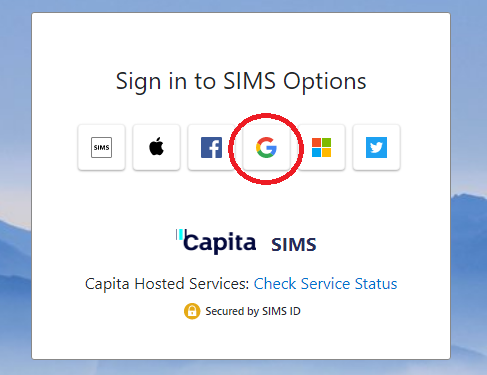
2. In your web browser, open the SIMS Options Online home page at www.sims-options.co.uk. Make sure you select the ‘Sign in with Google’ option for logging in:
 

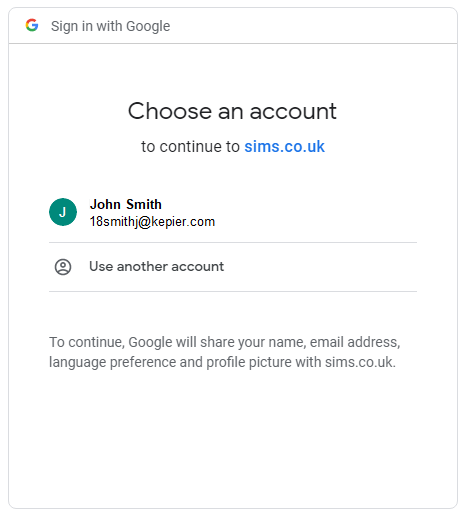
3. Log in to SIMS Options Online using your Kepier email address and password.
 

4. Once you have logged in, the SIMS Options Online home screen will be displayed. The screen is split into two sections – the main portion of the screen is where you will make your options choices. The selections you have made will appear at the right hand side:
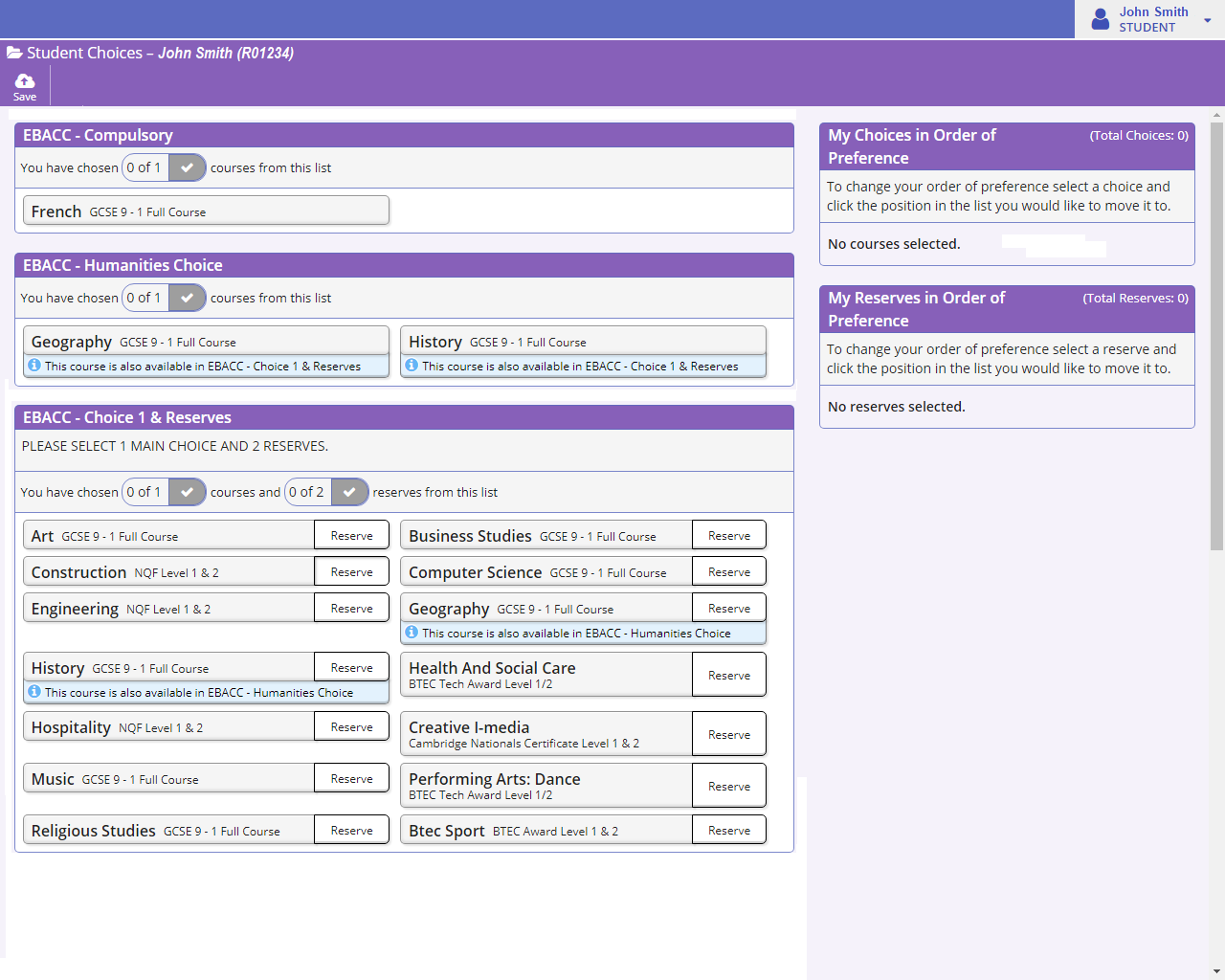
 

5. It’s best to start at the top and work down. Firstly, in section 1, you select the Languages subject you wish to study. Do this by clicking on the title of the subject you wish to choose. It will turn blue to indicate it has been selected.

As you will note, in the EBACC Pathway, only ‘French’ is available.

In the screenshot below, ‘French’ has been selected.

If you wish to cancel a selection you have made, simply click the title a second time.


6. You now need to make your choice in section 2, where you select the Humanities subject you wish to study. Do this by clicking on the title of the subject you wish to choose. It will turn blue to indicate it has been selected.

In the screenshot below, ‘History’ has been selected:.

If you wish to cancel a selection you have made, simply click the subject title a second time.


7. You now need to make your choices in section 3, where you will select a further subject you wish to study, and also two further reserve choices. To make your main choice, click on the subject title so it turns blue, as you did in the previous step. You can then select the reserve choices by clicking the word ‘Reserve’, so that it turns orange.

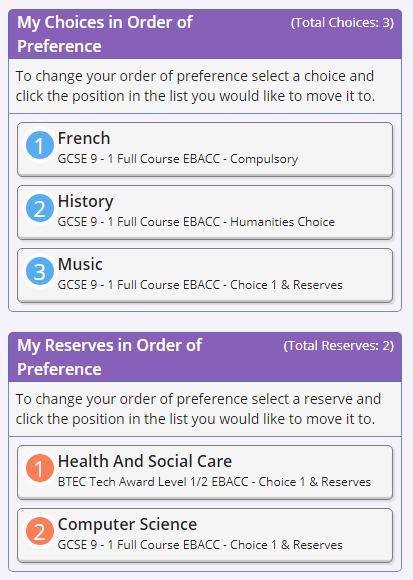
In the screenshot below, ‘Music’ has been selected as the main choice (blue), with ‘Computer Science’ and ‘Health and Social Care’ as the reserve choices (orange).
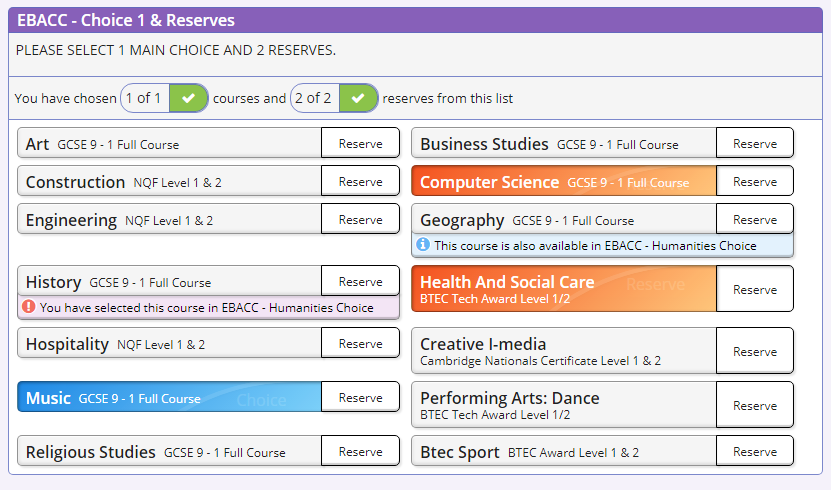
If you wish to cancel a selection you have made, simply click the subject title (or ‘Reserve’) a second time.


8. The selections you have made will be displayed at the right hand side of the screen. Check to ensure that you have made the correct selections:
 

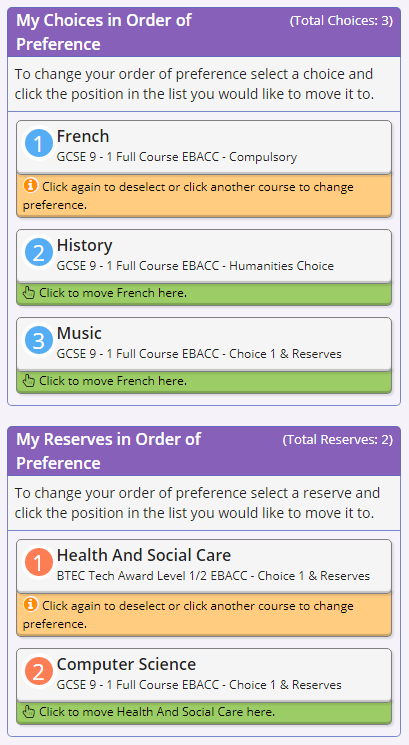
9. You now need to make sure that your choices are in the correct order with the subjects displayed in order of preference. If you wish to change the order, click on a subject to select it, then click the position in the list you would like to move it to:
 

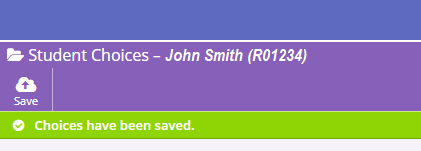
10. Once you have finished making your selections, and have made sure they are in the correct order of preference, click the ‘Save’ button at the top left hand side of the page:


11. Once you click ‘Save’ you will receive a message to indicate that your options choices have been saved.


Year 9 Options 2026

  • English (Core Subject)
  • Separate Sciences
  • Film Studies
  • Child Development
  • Art, Craft and Design
  • Photography
  • How To Make Your Football Options Choices
  • How To Make Your EBACC Options Choices
  • How To Make Your Core Options Choices
  • Football Pathway
  • Ebacc Pathway
  • Core Pathway
  • Key Stage 4 Curriculum Information Evening
  • Science (Core Subject)
  • Maths (Core Subject)
  • Art (Fine Art)
  • Sport
  • Enterprise
  • Computer Science
  • Construction
  • Creative iMedia
  • Design and Technology
  • Engineering
  • French
  • Geography
  • Graphics
  • Health and Social Care
  • History
  • Hospitality and Catering
  • Music
  • Dance
  • Religious Studies
  • How To Register for SIMS Options
Kepier is part of the Eden Learning Trust
Registered in England Company No: 10980753
Charitable Limited Company Status

Headteacher: Mr C Devlin

Kepier, Dairy Lane, Houghton Le Spring
Tyne & Wear, DH4 5BH
0191 512 8960

General enquiries fao Mrs S Younghusband, HR and Governance/Core SLT Support:
info@kepier.com
SENDCO enquiries fao Miss D Ross:
sendco@kepier.com
  • Synergy
  • Google Classrooms
  • Hegarty Maths
  • ParentPay
  • Reading Cloud
  • Privacy Policy

Important Notice – Year 9 Options

Please note that the Year 9 options information currently on our website dates from February 2024 and relates to the 2024 options process.

This information remains available for reference purposes, however it is important to note that the options process changes each year and therefore the information from 2024 does not reflect how the options process may operate in future years.

School website powered by Realsmart Logo